
Website performance is crucial for user experience and search engine rankings. A slow-loading website can lead to frustrated users, increased bounce rates, and ultimately lost opportunities. It's important to ensure that your site runs smoothly to keep visitors engaged and coming back. Here are some common website performance issues and effective strategies to fix them:

1. Slow Page Load Time
One major issue affecting websites today is slow page loading times. Prolonged loading can significantly harm user experience, leading to higher bounce rates. When users encounter delays in content appearing, they are more likely to leave the site, which decreases engagement and can ultimately result in lost revenue.
To enhance website performance, it's crucial to optimize loading times. By prioritizing speed, you can retain visitors, boost user engagement, and improve your site's overall success.
Fix- Compress images and videos to reduce file size.
- Minify CSS, JavaScript, and HTML files to reduce the size of web pages.
- Use a Content Delivery Network (CDN) to distribute content more efficiently.
- Enable browser caching so returning visitors can load pages faster.
2. Unoptimized Images
Large, high-resolution images can significantly impact your website's loading speed, leading to slower performance and potentially frustrating user experiences. When images are too large, they take longer to load, which can increase bounce rates and affect overall user engagement. It's essential to optimize image sizes for better website efficiency.
Fix- Use the appropriate file format (JPEG for photographs, PNG for graphics).
- Resize images to the required display dimensions.
- Compress images using tools like TinyPNG or ImageOptim.
3. Excessive HTTP Requests
Excessive HTTP requests can hinder your website's performance as they compel the browser to fetch multiple elements, such as scripts, images, and stylesheets, which can lead to longer loading times and a less efficient user experience.
Fix- Combine CSS and JavaScript files to reduce the number of requests.
- Use inline CSS for small styles and load scripts asynchronously.
- Use lazy loading for images and videos to load them only when needed.
4. Lack of Browser Caching
Browsers refresh and download all website resources, such as images, scripts, and stylesheets, every time a user navigates to a site. This process ensures that the user receives the most up-to-date content but can slow down loading times since all elements are fetched anew with each visit.
Fix- Enable browser caching to store elements like images, CSS, and JavaScript files in the visitor’s browser, reducing future load times.

5. Unoptimized Code
Inefficient or bloated code refers to programming that is unnecessarily complex or contains excessive elements, which can lead to slower loading times and decreased performance of your website. This can negatively impact user experience, as visitors may become frustrated with long wait times or unresponsive pages. Optimizing your code by removing redundancies and streamlining processes is crucial for enhancing website speed and efficiency.
Fix- Minify CSS, JavaScript, and HTML files by removing unnecessary spaces, comments, and line breaks.
- Remove unused code and third-party scripts that are no longer needed
6. Server Issues
A slow or overloaded server can significantly hinder user experience by increasing the time it takes for web pages to load. This delay can frustrate users, lead to higher bounce rates, and negatively impact overall website performance. Factors contributing to server slowdown include high traffic, insufficient resources, and poor optimization, all of which can compromise the efficiency of web applications.
Fix- Upgrade to a better hosting plan (e.g., VPS or dedicated server).
- Use a CDN to distribute server load.
- Optimize database queries if using a CMS like WordPress.
7. Lack of Mobile Optimization
Websites that lack mobile-friendliness often experience slow loading times and deliver a subpar user experience on mobile devices, making it difficult for users to navigate and engage with the content effectively. This can lead to frustration and increased bounce rates, ultimately impacting the site's overall success and user satisfaction.
Fix- Use responsive design to ensure your site adapts to different screen sizes.
- Optimize media for mobile devices by using appropriate sizes and compressions.
8. Too Many Plugins
Excessive use of plugins, particularly on WordPress, can lead to a slower website performance and increase security risks. Each plugin adds additional code that your site must process, which can hinder loading times. Additionally, poorly maintained or outdated plugins can open up vulnerabilities, making your site more susceptible to attacks. It's important to carefully select and limit the number of plugins to ensure optimal speed and security.
Fix- Deactivate or delete unnecessary plugins.
- Use lightweight alternatives for plugins that perform the same function.
- Regularly update your plugins to improve performance and security.
9. Not Using Gzip Compression
Uncompressed files are larger in size, which means they contain more data that needs to be processed when loading. As a result, they require more time to transfer from storage to memory and display, leading to longer loading times compared to their compressed counterparts.
Fix- Enable Gzip compression on your server to reduce the size of your CSS, JavaScript, and HTML files, leading to faster loading times.
10. Missing or Poor Caching Strategies
Failure to implement caching can lead to the repeated loading of the same elements on a website, which significantly slows down its performance. This not only frustrates users as they wait for pages to load, but it can also negatively impact search engine rankings, as site speed is a critical factor in SEO. By using caching effectively, web applications can store frequently accessed data, reducing load times and providing a smoother user experience..
Fix- Use caching tools such as WP Super Cache (WordPress) or Varnish to store static versions of your website.
- Configure cache expiration times based on the frequency of content changes.
11. Poorly Optimized Database
A disorganized or inefficient database, especially within content management systems such as WordPress, can significantly hinder website performance. This can lead to slower load times, reduced user experience, and potentially lower search engine rankings. Proper database optimization is crucial for maintaining a fast and responsive site.
Fix- Regularly clean up and optimize your database by removing unnecessary data like post revisions, spam comments, and outdated transient options.
- Use database optimization plugins (e.g., WP-Optimize for WordPress).
- Consider switching to a more efficient database management system or structure for high-traffic websites.
12. Render-Blocking JavaScript
JavaScript files that must be executed before the page can fully load can cause delays in loading times. This occurs because the browser has to wait for these scripts to run, which can impact the overall user experience by making the page appear unresponsive or slow to load.
Fix- Defer the loading of non-essential JavaScript files by using the defer or async attributes.
- Move JavaScript files to the bottom of the page to allow critical content to load first.
13. Not Using HTTP/2
Websites that utilize older HTTP protocols often face slower load times, which can be attributed to several limitations inherent in these outdated systems. Specifically, older protocols are restricted in the number of simultaneous requests they can manage, leading to bottlenecks when multiple users access the site at once.
This inefficiency not only frustrates users but can also negatively impact the overall performance and user experience of the website, potentially resulting in higher bounce rates and lower engagement. Upgrading to more modern protocols can significantly enhance speed and responsiveness, providing a smoother browsing experience.
Fix- Enable HTTP/2 on your server to allow for faster, more efficient data transfer between the server and browser by handling multiple requests in parallel.
14. Inefficient Web Hosting
Websites that utilize older HTTP protocols often face slower load times, which can be attributed to several limitations inherent in these outdated systems. Specifically, older protocols are restricted in the number of simultaneous requests they can manage, leading to bottlenecks when multiple users access the site at once.
As a result, potential customers may abandon your site in favor of competitors, ultimately affecting your overall business success. Investing in a more reliable hosting solution is essential for maintaining optimal performance and user satisfaction.
Fix- Upgrade to a more powerful hosting plan like VPS (Virtual Private Server) or a dedicated server.
- Choose a hosting provider that offers optimized infrastructure for your CMS, such as WordPress or Joomla.
- Monitor your server’s performance regularly to ensure that it meets your traffic demands.
15. Too Many Redirects
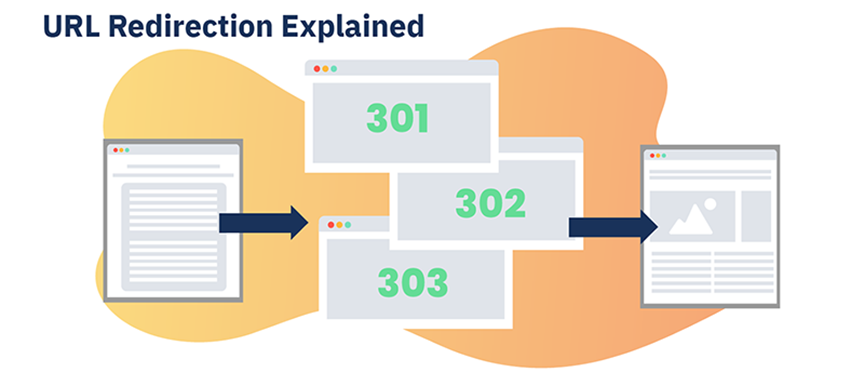
Excessive redirects, often resulting from outdated URLs, can hinder website performance. They lead to delays in page loading times because the browser must process multiple requests before reaching the final destination. This can frustrate users and negatively impact the overall browsing experience.
Fix- Minimize redirects by regularly auditing and fixing broken or unnecessary links.
- Avoid chain redirects, where multiple redirects occur before reaching the final destination.
- Ensure that canonical URLs are properly set up to avoid unnecessary redirection.
16. Inefficient Use of External Resources
Heavy reliance on external scripts, fonts, and resources—such as social media widgets or embedded videos—can significantly hinder your website's loading speed and overall performance. This can lead to a frustrating user experience, as visitors may encounter delays while waiting for content to load. To enhance site efficiency, it's important to manage and optimize these external elements carefully.
Fix- Host essential scripts locally, where possible, instead of linking to external servers.
- Reduce the use of external fonts or use system fonts for faster loading.
- Implement lazy loading for third-party resources like videos or social media widgets to load them only when required.
17. Excessive Use of Web Fonts
Custom web fonts can significantly impact your website's performance by adding extra weight to your pages. This additional weight can lead to longer loading times, potentially affecting user experience and engagement. It's crucial to balance aesthetic choices with performance considerations when selecting web fonts for your site.
Fix- Limit the number of font families and weights used on your site.
- Use modern font formats like WOFF2, which are optimized for faster loading.
- Preload important fonts to improve loading speed for above-the-fold content.
18. Too Many Ads
Displaying multiple ads, especially animated or video ads, can significantly hinder site performance. This is primarily due to increased loading times, as each ad requires additional resources to load, which can slow down the overall speed of the website.
Furthermore, these types of ads consume more bandwidth, leading to potential issues for users with limited data or slower internet connections. This combination not only frustrates users but may also result in higher bounce rates, as visitors are likely to leave a site that feels sluggish and unresponsive. Ultimately, prioritizing a streamlined user experience can lead to better engagement and retention.
Fix- Limit the number of ads per page to ensure a smooth user experience.
- Use asynchronous loading for ads, so they don’t block other content from loading.
- Monitor the performance of ad networks to ensure they are not affecting your site's speed.
19. Not Implementing Lazy Loading
Loading all images and videos simultaneously can significantly slow down the initial page load, particularly for content-heavy sites that rely on rich media to engage users. When a website attempts to load a large number of visual elements at once, it can overwhelm the server and the user's browser, leading to longer wait times and a frustrating experience.
To optimize performance, it's essential to consider lazy loading techniques or prioritizing the loading of essential content first, ensuring that users can access the site quickly without unnecessary delays.
Fix- Implement lazy loading for images and videos, so they only load when the user scrolls to them.
- Use plugins or custom scripts that defer the loading of media until they’re needed, which reduces the load on the server.
20. Not Utilizing Pre-connect, Prefetch, or Preload
When browsers need to load external resources, such as fonts, stylesheets, or images, it can significantly slow down page rendering. This occurs because the browser must make additional HTTP requests to fetch these resources, which can introduce delays. If these resources are large or if the server hosting them is slow to respond, users may experience longer wait times before seeing the complete webpage.
Optimizing the loading of these assets, perhaps by using techniques like lazy loading or caching, can greatly enhance the overall performance and user experience of a website.
Fix- Use pre-connect to establish early connections to external resources.
- Use prefetch for resources that may be needed on subsequent pages.
- Use preload for critical assets like fonts or important images to ensure they are loaded quickly.
21. Large JavaScript Libraries
Using large JavaScript libraries like jQuery or React can add significant overhead to page load times, which may negatively impact user experience. When these libraries are included, they often require additional resources to be downloaded and parsed by the browser, leading to slower initial rendering.
Therefore, while these libraries can provide powerful functionality and streamline development, it's essential for developers to carefully consider their impact on performance and explore optimization techniques, such as code splitting or lazy loading, to mitigate potential delays.
Fix- Only load the parts of the JavaScript library that you need, or use lightweight alternatives.
- Consider using native JavaScript (vanilla JS) for simple tasks instead of relying on libraries.
22. Failure to Use Critical CSS
Optimizing CSS files is crucial for improving website performance and enhancing user experience. Unoptimized CSS can significantly delay the rendering of above-the-fold content—the part of a webpage that users see first without scrolling—resulting in a slower initial page load.
This delay can negatively impact user experience and increase bounce rates. To boost loading times and provide a smoother experience for visitors, it's essential to optimize CSS files by minimizing their size, removing unused styles, and combining files when possible. By implementing these best practices, you can enhance your site's performance and keep users engaged.
Fix- Extract and inline critical CSS that is needed for the above-the-fold content to display, so it loads immediately.
- Load non-critical CSS asynchronously to speed up the initial rendering

23. Not Leveraging AMP (Accelerated Mobile Pages)
Websites that do not use AMP (Accelerated Mobile Pages) risk experiencing slower load times on mobile devices, leading to a frustrating user experience. Slow-loading pages often result in higher bounce rates, as users tend to leave if a page takes too long to load.
In today’s fast-paced digital landscape, where mobile browsing is dominant, fast website loading is essential for keeping visitors engaged and satisfied. Failing to implement AMP can lead to lost traffic and missed conversion opportunities, ultimately affecting your website's success. Optimize your site for speed and improve user experience by adopting AMP to enhance mobile performance and drive growth.
Fix- Implement AMP to create lightweight, fast-loading mobile pages, especially for blogs, news sites, and content-heavy pages.
24. Unoptimized CSS and JavaScript Delivery
Large CSS and JavaScript files can drastically slow down website loading times, leading to a poor user experience. When these files take longer to download, they can block rendering, causing website content to remain hidden until the files are fully processed.
To enhance user experience and improve site performance, it's essential to optimize these files. By minimizing file sizes and utilizing efficient coding practices, you can ensure that visitors access your content quickly and efficiently, keeping them engaged on your site. Prioritizing optimization is key to boosting your website's speed and user satisfaction.
Fix- Use code splitting to load only the CSS and JavaScript that is necessary for each page.
- Load non-essential CSS and JavaScript asynchronously or defer their execution.
25. Poor SEO Practices Affecting Performance
Effective SEO practices are crucial for enhancing your website's performance. Neglecting key elements like sitemaps, overusing internal links without a clear strategy, and not optimizing meta tags can significantly impact your site's visibility. Poor SEO can confuse both users and search engines, leading to lower search engine rankings.
Creating a well-structured sitemap is essential as it helps search engines understand your site's layout, improving crawl efficiency. Strategically placing internal links not only aids in user navigation but also distributes page authority effectively. Additionally, optimized meta tags play a vital role in defining your page content and attracting clicks from search results.
By addressing these SEO factors, you can improve your website's visibility and overall performance in the competitive online landscape. Prioritize these best practices to ensure your site stands out in search engine results.
Fix- Ensure your site has a clean and optimized sitemap.
- Use SEO-friendly URLs and ensure meta tags are well-optimized.
- Regularly audit your site’s SEO to avoid excessive links and ensure fast page indexing.
By fixing these issues, your website will run faster, provide a better user experience, and improve search engine rankings, ultimately driving more traffic and engagement.
